Tuesday, 31 March 2015

AngularJS Convert Number to Currency Format


//HTML

<html xmlns="http://www.w3.org/1999/xhtml">
  <head>
    <title>Limit Number to 2 decmial places in Angularjs</title>
    <script src="https://ajax.googleapis.com/ajax/libs/angularjs/1.3.9/angular.min.js"></script>
    <script type="text/javascript">
      var myApp = angular.module('divid', [])
      myApp.controller("expressionController", function ($scope) {
      $scope.amount = 99999.56;
      });
    </script>
  </head>
  <body>
    <form id="form1">
      <div data-ng-app="divid" data-ng-controller="expressionController">
        <input type="number" ng-model="amount">
          <br/>
          default currency symbol ($): <span>{{amount | currency}}</span><br>
            <!--By default its $ sign-->
            no fractions: <span>{{amount | currency:"Currency Symbol  "}}</span><br>
              <!--Currency Symbol - Put your currency symbol -->
              no of fractions:<span>{{amount | currency:"Currency Symbol  ":1}}</span><br>
                <!-- :1 decimal place-->
                no of fractions:<span>{{amount | currency:"Currency Symbol  ":0}}</span><!-- :1 decimal place-->
                <!---->
              </div>
    </form>
  </body>

</html>


// Result


Wednesday, 25 March 2015

Export String to PDF using C# with iTextSharp DLL


//add name space

using iTextSharp.text.pdf;
using iTextSharp.text.pdf.parser;
using iTextSharp.text.html.simpleparser;

using iTextSharp.text;


//String

StringBuilder strBuilder = new StringBuilder();
            strBuilder.Append("<h1 title='Header' align='Center'>Writing To Word File using windows form in c#</h1> ".ToString());
            strBuilder.Append("<br>".ToString());
            strBuilder.Append("<table border='1' align='Center'>".ToString());
            strBuilder.Append("<tr>".ToString());
            strBuilder.Append("<td style='width:30%;color:green'><b>Krishna Kumar Chaturvedi</b></td>".ToString());
            strBuilder.Append("<td style='width:30%;color:red'>India</td>".ToString());
            strBuilder.Append("<td style='width:30%;color:red'>Software developer</td>".ToString());
            strBuilder.Append("</tr>".ToString());
            strBuilder.Append("</table>".ToString());
            string strPath = textBox1.Text + "Test" + DateTime.Now.ToString("hhmmss") + ".pdf";

//Create PDF
using (FileStream stream = new FileStream(strPath, FileMode.Create))
            {
                Document pdfDoc = new Document(PageSize.A2, 10f, 10f, 10f, 0f);
                HTMLWorker htmlparser = new HTMLWorker(pdfDoc);
                PdfWriter.GetInstance(pdfDoc, stream);
                pdfDoc.Open();
                htmlparser.Parse(sr);
                pdfDoc.Close();
                stream.Close();
            }

//result


Tuesday, 24 March 2015

Show Number formate Columns to Text formate in excel export in asp.net, C#


            string datestyle = @"<style> .nf{mso-number-format:\@;}</style>";

//add this string to your export data table
            HttpResponse Response = HttpContext.Current.Response;
            string filename = "Test" + "_" + System.DateTime.Now.ToString("MMddyy_hhmmss") + ".doc";
            Response.Clear();
            Response.AddHeader("content-disposition", "attachment;filename=" + filename);
            Response.Charset = "";
            Response.ContentType = "application/xls";
            System.IO.StringWriter WriteItem = new System.IO.StringWriter();
            System.Web.UI.HtmlTextWriter htmlText = newHtmlTextWriter(WriteItem);

            Response.Write(datestyle);
            Response.Write(strBuilder.ToString());
            Response.End();

Print report in MS Word using asp.net C# without using MS word dll


Step 1- Click on Print button


private void button1_Click(object sender, EventArgs e)
        {
            StringBuilder strBuilder = new StringBuilder();
            strBuilder.Append("<h1 title='Header' align='Center'>Writing To Word File using windows form in c#</h1> ".ToString());
            strBuilder.Append("<br>".ToString());
            strBuilder.Append("<table border='1' align='Center'>".ToString());
            strBuilder.Append("<tr>".ToString());
            strBuilder.Append("<td style='width:30%;color:green'><b>Krishna Kumar Chaturvedi</b></td>".ToString());
            strBuilder.Append("<td style='width:30%;color:red'>India</td>".ToString());
            strBuilder.Append("<td style='width:30%;color:red'>Software developer</td>".ToString());
            strBuilder.Append("</tr>".ToString());
            strBuilder.Append("</table>".ToString());

  string datestyle = @"<style> .nf{mso-number-format:\@;}</style>";
            HttpResponse Response = HttpContext.Current.Response;
            string filename = "Test" + "_" + System.DateTime.Now.ToString("MMddyy_hhmmss") + ".doc";
            Response.Clear();
            Response.AddHeader("content-disposition", "attachment;filename=" + filename);
            Response.Charset = "";
            Response.ContentType = "application/xls";
            System.IO.StringWriter WriteItem = new System.IO.StringWriter();
            System.Web.UI.HtmlTextWriter htmlText = new HtmlTextWriter(WriteItem);

            Response.Write(datestyle);
            Response.Write(strBuilder.ToString());
            Response.End();

        }


//Result

Print Report in MS word using StringBuilder in c# without using MS word dll


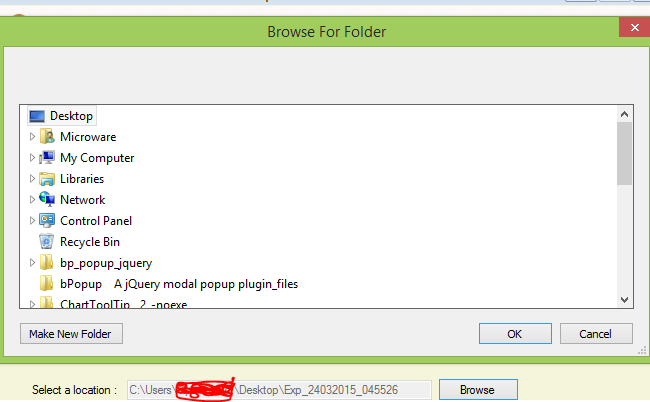
Step 1- Create a fileupload dialogue to set path of the file


Step 2- Write code on print button Click event

private void button1_Click(object sender, EventArgs e)
        {
            StringBuilder strBuilder = new StringBuilder();
            strBuilder.Append("<h1 title='Header' align='Center'>Writing To Word File using windows form in c#</h1> ".ToString());
            strBuilder.Append("<br>".ToString());
            strBuilder.Append("<table border='1' align='Center'>".ToString());
            strBuilder.Append("<tr>".ToString());
            strBuilder.Append("<td style='width:100px;color:green'><b>amiT</b></td>".ToString());
            strBuilder.Append("<td style='width:100px;color:red'>India</td>".ToString());
            strBuilder.Append("</tr>".ToString());
            strBuilder.Append("</table>".ToString());
            string strPath =textBox1.Text+"Test"+DateTime.Now.ToString("hhmmss")+".doc";
            FileStream fStream = File.Create(strPath);
            fStream.Close();
            StreamWriter sWriter = new StreamWriter(strPath);
            sWriter.Write(strBuilder);
            sWriter.Close();

        }

//Result


Wednesday, 11 March 2015

How to Export Encoded Data into CSV Files using asp.net c#


//Data Tabel


//HTML
<asp:Button ID="btnExport" runat="server" Text="Button" OnClick="btnExport_Click" />

//Code Behind

protected void btnExport_Click(object sender, EventArgs e)
    {
        DataTable dt = GetData();
        StringBuilder builder = new StringBuilder();
        var count = 0;

        // write header in String Builder
        foreach (DataColumn column in dt.Columns)
        {
            count++;
            string content = column.ColumnName + "";
            content = content.Replace("\"", "\"\"");
            builder.Append(string.Format("{0}{1}{0}", Convert.ToChar(34), content));

            if (count < dt.Columns.Count)
                builder.Append(",");
        }
        builder.Append(Environment.NewLine);

        //Write content in String Builder
        foreach (DataRow row in dt.Rows)
        {
            for (int i = 0; i < row.ItemArray.Length; i++)
            {
                if (!Convert.IsDBNull(row[i]))
                {
                    string content = row[i].ToString() + "";
                    content = content.Replace("\"", "\"\"");
                    builder.Append(string.Format("{0}{1}{0}", Convert.ToChar(34), content));

                    if (i < row.ItemArray.Length - 1)
                        builder.Append(",");
                }
            }
            builder.Append(Environment.NewLine);
        }

        // get file and write inside file
        using (var streamWriter = new StreamWriter(@"C://Users//Vipin Gehlot//Desktop//yy.csv", false, Encoding.UTF8))
        {
            streamWriter.Write(builder.ToString());
            streamWriter.Flush();
            streamWriter.Close();
        }
    }
}


//Result


Thursday, 26 February 2015

MS Chart set dynamically Legends using asp.net C#


//Html

<asp:Chart ID="Chart2" runat="server" style=" min-width:99%; display:none;"  onmouseover="return hidedownloadchart('ch2d','ch1d','ch3d');" >
            <Series>  
            </Series>
            <ChartAreas>
                <asp:ChartArea Name="ChartArea1">
                </asp:ChartArea>
            </ChartAreas>
             <Legends>
            <asp:Legend TextWrapThreshold="200" font ="11px"></asp:Legend>
            </Legends>
        </asp:Chart>

//Legends

System.Web.UI.DataVisualization.Charting.Legend legend = new System.Web.UI.DataVisualization.Charting.Legend();
        legend.BackColor = System.Drawing.Color.Transparent;
        legend.Enabled = false;
        legend.Font = new System.Drawing.Font("Trebuchet MS", 8.25F, System.Drawing.FontStyle.Bold);
        legend.IsTextAutoFit = false;
        legend.Name = "Default";

How to highlight selected text in notepad++

  –> To highlight a block of code in Notepad++, please do the following steps step-1  :- Select the required text. step-2  :- Right click...