Wednesday, 27 May 2020

Export HTML string / table to Excel file formatted way with fixed width of column in ASP.Net using C#


protected void Button2_Click(object sender, EventArgs e)
    {

        DataTable dt = new DataTable();
        dt.Columns.Add("RollNo");
        dt.Columns.Add("Name");
        dt.Columns.Add("College Name");
        DataRow dr;
        int rn = 1001;
        for (int i = 0; i < 10; i++)
        {
            dr = dt.NewRow();
            dr[0] = (rn).ToString();
            dr[1] = "Raja_"+i.ToString();
            dr[2] = "Name of IT College_"+i.ToString();
            dt.Rows.Add(dr);
            rn++;
        }
        dt.AcceptChanges();
       
        StrExport.Append(@"<html xmlns:o='urn:schemas-microsoft-com:office:office' xmlns:w='urn:schemas-microsoft-com:office:excel' xmlns='http://www.w3.org/TR/REC-html40'><head><title>Time</title>");
        StrExport.Append(@"<body lang=EN-US style='mso-element:header' id=h1><span style='mso--code:DATE'></span><div class=Section1>");
        StrExport.Append("<div style='font-size:12px;'>");
        // StrExport.Append(dvInfo.InnerHtml);
        StrExport.Append("<div><center style='font-size: 12pt;'><b>This excel generated by Krishna kumar chaturvedi</b></center></div><br />");

        StrExport.Append("<table align='center' border='1' bordercolor='#00aeef' class='reporttable1' cellspacing='0' cellpadding='0' style='font-size: 10pt;'>");
        //StrExport.Append("<tr align='center'>");
        string[] sty = {"70","300","90" };
        for (int i = 0; i < dt.Columns.Count; i++)
        {
            StrExport.Append("<th style='width: "+ sty [i]+ "px;word-break: break-word;'>" + dt.Columns[i].ColumnName+"</th>");
        }
        StrExport.Append("</tr>");
        for (int i = 0; i < dt.Rows.Count; i++)
        {
            StrExport.Append("<tr>");
            for (int c = 0; c < dt.Columns.Count; c++)
            {
                StrExport.Append("<td>"+Convert.ToString(dt.Rows[i][c])+"</td>");
            }
            StrExport.Append("</tr>");
        }
        StrExport.Append("</table>");
        StrExport.Append("</div></body></html>");
        string strFile = "testexl.xls";
        string strcontentType = "application/excel";
        Response.ContentEncoding = Encoding.UTF8;
        Response.ClearContent();
        Response.ClearHeaders();
        Response.BufferOutput = true;
        Response.ContentType = strcontentType;
        Response.AddHeader("Content-Disposition", "attachment; filename=" + strFile);
        Response.Write(StrExport.ToString());
        Response.Flush();
        Response.Close();
        Response.End();
    }


------------------------------------ Result


Tuesday, 26 May 2020

SQL dynamic where clause with using exce in select statement


declare @RoleID varchar(10)=''
,@Roleid1 varchar(10)=''
,@RID varchar(10)='1'

select * from(select rid,username,roleid from tbl_user_registration) dt

------------ If need to use Equal(=) then

where rid = iif(len(isnull(@RID,''))=0, RID , @RID)


--------- Result---------


============================================================


declare @RoleID varchar(10)='20' ,@Roleid1 varchar(10)='30',@RID varchar(10)='1'

select * from(select rid,username,roleid from tbl_user_registration) dt


------------ If need to use between then
where roleid between iif(len(isnull(@RoleID,''))=0, roleid , @RoleID) and iif(len(isnull(@RoleID1,''))=0, roleid , @RoleID1)


----------------------- Result


=====================================================================================


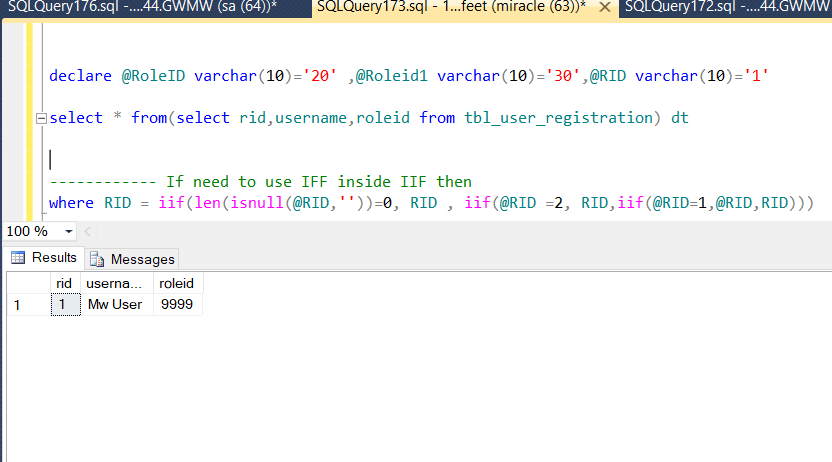
declare @RoleID varchar(10)='20' ,@Roleid1 varchar(10)='30',@RID varchar(10)='1'

select * from(select rid,username,roleid from tbl_user_registration) dt


------------ If need to use IFF inside IIF then
where RID = iif(len(isnull(@RID,''))=0, RID , iif(@RID =2, RID,iif(@RID=1,@RID,RID)))

----------------------- Result


Friday, 22 May 2020

While loop on table rows in sql server using cursor


DECLARE @RID INT;
 ---- get table rid inside CUR_TEST
DECLARE CUR_TEST CURSOR FAST_FORWARD FOR SELECT RID FROM  tbl_User_Registration

OPEN CUR_TEST
FETCH NEXT FROM CUR_TEST INTO @RID

WHILE @@FETCH_STATUS = 0
BEGIN
declare @EmdilID varchar(100)='test@gmail.com'

   UPDATE tbl_User_Registration SET emialid = @EmdilID WHERE RID = @RID;

   FETCH NEXT FROM CUR_TEST INTO @RID
END
CLOSE CUR_TEST
DEALLOCATE CUR_TEST
GO

While loop on table rows in sql server


DECLARE @CursorTestID INT = 1;
DECLARE @RowCnt BIGINT = 0;

-- get total count of rows to process
SELECT @RowCnt = COUNT(0) FROM tbl_User_Registration;

WHILE @CursorTestID <= @RowCnt
BEGIN
declare @StrBinary varchar(350)='abc12345'

   UPDATE tbl_User_Registration SET [Password] = @StrBinary WHERE [Password] is null;
   SET @CursorTestID = @CursorTestID + 1

END


Thursday, 2 April 2020

Calculate number of months between two dates using javascript


<script>

    var dtfrm ='10/01/2019';//////////dd/mm/yyyy
    var dtto = '31/03/2019';
    var d1 = dtfrm.split('/');
    var d2 = dtto.split('/');
    var frstdate = new Date(d1[2], (parseFloat(d1[1]) - 1).toFixed(0), d1[0]);
    var secdate = new Date(d2[2], (parseFloat(d2[1]) - 1).toFixed(0), d2[0]);
    if (frstdate > secdate) {
        var dtothr;
        dtothr = frstdate;
        frstdate = secdate;       
        secdate = dtothr;
    }
    var mnth = ((secdate.getFullYear() * 12 + secdate.getMonth()) - (frstdate.getFullYear() * 12 + frstdate.getMonth()));

  
    alert(mnth);
</script>


Result///

Friday, 6 March 2020

Delete read only condition files in c# or asp.net c# or windows services


public void Delete_file_ReadonlyCondition(string FilePath)
        {
         //// Set file permission to delete file
            FileAttributes attributes = File.GetAttributes(FilePath);
            if ((attributes & FileAttributes.ReadOnly) == FileAttributes.ReadOnly)
            {
                attributes &= ~FileAttributes.ReadOnly;
                File.SetAttributes(FilePath, attributes);
                File.Delete(FilePath);
            }
            else
            {
                FileInfo f = new FileInfo(FilePath);
                if (f.Exists)
                {
                    File.SetAttributes(FilePath, FileAttributes.Normal);
                    File.Delete(FilePath);
                }
            }
        }

Thursday, 5 March 2020

xcopy command - copy files from one folder to another using command in c# or windows services


/////////////////// Create file for the process execute


public void Create_BatFile_ForCopyFiles()
        {
            string mDrive = "C:",  //// Drive where want to create file
                SourcePath = "\\WindowService\\Service\\Test.txt", //// Source path DIR
                BatFileName = "Testbatch.bat",   ///// Batch file name 'you can create folder with this batch file
                DestinationPath = "E:\\Folder1\\Folder2\\CopyTest.txt";  //// Destination path DIR

            string ProgramPath = mDrive + "\\"+BatFileName;
            try
            {
                List<string> list = new List<string>
                    {
                        ///// command =>> From path =>> To Path
                        "xcopy "+SourcePath+" "+DestinationPath+@"\"   //// @"\" auto permission to copy the file to the given path
                      };
                File.WriteAllLines(mDrive + "\\" + BatFileName, list.ToArray());/// create batch file in C drive
            }
            catch (Exception ex)
            {
            }
            Execute_Process(ProgramPath); //// Execute batch file with process to create list of file inside the DIR
        }

/////////////////// Execute process copy file 


        public void Execute_Process(string ProcessBatFileFullPathWithName)
        {
            try
            {
                Process prsCopy = new Process();
                prsCopy.StartInfo.RedirectStandardError = true;
                prsCopy.StartInfo.RedirectStandardInput = true;
                prsCopy.StartInfo.RedirectStandardOutput = true;
                prsCopy.StartInfo.UseShellExecute = false;
                prsCopy.StartInfo.CreateNoWindow = true;
                prsCopy.StartInfo.WindowStyle = ProcessWindowStyle.Hidden;
                prsCopy.StartInfo.FileName = ProcessBatFileFullPathWithName;
                prsCopy.Start();
                prsCopy.WaitForExit();

            }
            catch (Exception ex)
            {
            }
        }

How to highlight selected text in notepad++

  –> To highlight a block of code in Notepad++, please do the following steps step-1  :- Select the required text. step-2  :- Right click...