Tuesday, 31 December 2019

Validate Jquery function before form submission in mvc

//////////////////  HTML


     <form id="formIDs">
       <input type="text" name="name" id="inputids">
        <br>
       <button type="button" onclick="SubmitRemarks()">Validate!</button>


     </form>


/////////////////////////// JS

<script type="text/javascript">
    function CalFrmSubmit() {
        if ($("#inputids").val() == "") {
            $("#formIDs").valid();
            Alert("Please select fill input");
            return false;
        }
        else {
            $("#formIDs").submit();
        }
    }
</script>

Tuesday, 24 December 2019

Convert Number Month to Name Month Function in sql server

/////////////////////

DECLARE @MyMonth varchar(10)='2'
DECLARE @dates datetime2 = '1900-'+@MyMonth+'-01';

SELECT DATENAME(month, DATEADD(month, @MyMonth-1, CAST('2008-01-01' AS datetime)))[MonthName]

---------- Or
select DATENAME(Month,'1900-'+@MyMonth+'-01')[MonthName]

---------- Or

-------------- or With Fn
SELECT {fn MONTHNAME(@dates)} [MonthName];


SELECT FORMAT(@dates, 'MMMM') AS [MonthName];

---------- Or Culture wise
SELECT
    FORMAT(@dates, 'MMMM', 'en-US') AS 'en-US',
    FORMAT(@dates, 'MMMM', 'es-es') AS 'es-es',
    FORMAT(@dates, 'MMMM', 'de-de') AS 'de-de',
    FORMAT(@dates, 'MMMM', 'en-GB') AS 'zh-cn';

---------- Or Frist 3 char
select left(DATENAME(Month,'1900-'+@MyMonth+'-01'),3)[MonthName]

////////// Result

February

Feb

Convert varchar DD-MM-YYYY or DD/MM/YYYY to YYYY-MM-DD in SQL Query

//////////////////


declare @DateStr varchar(100)=
'13-09-2019' --or '13/09/2019'
or '2019-09-13'
or 


SELECT case when len(isnull(@DateStr ,''))>0 then CONVERT(VARCHAR(10), case when substring(@DateStr ,5,1)='-' or substring(@DateStr ,5,1)='/'then @DateStr else CONVERT(date, @DateStr , 105) end, 23) else null end


//////////////////// Result

2019-09-13 or 
2019-09-13 or  
2019-09-13 or 
NULL

Sunday, 15 December 2019

"NetworkError: 404 Not Found fontawesome-webfont.woff2?v=4.7 in mvc

/////////////////// Error


//////////// Solution >> Web.config file >> System.webserver

<system.webServer>
    <staticContent>
      <remove fileExtension=".woff"/>
      <mimeMap fileExtension=".woff" mimeType="application/x-font-woff" />
      <remove fileExtension=".woff2" />
      <mimeMap fileExtension=".woff2" mimeType="font/x-woff" />
    </staticContent>
  </system.webServer>

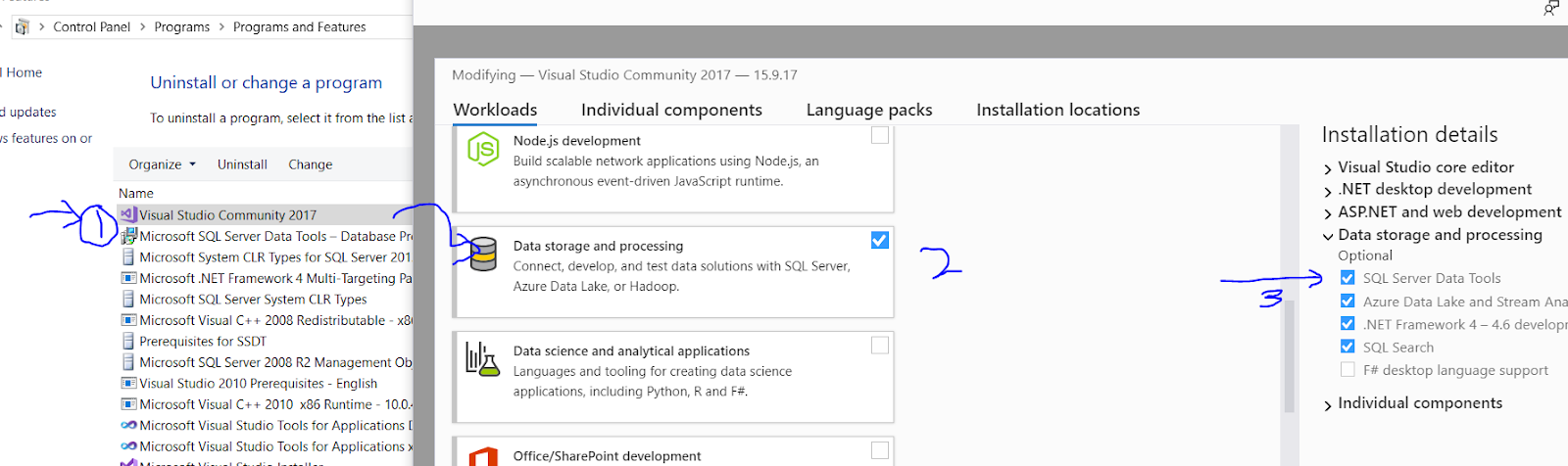
Missing Microsoft RDLC Report Designer in Visual Studio 2015,2017,2019

////////////////
Step 1.

     Goto >> Control Panel >> Programs and Features >> Visual Studio --Version >> Change >> Select- Data Storage and Processing >> Sql Server Data Tools


////////////////
Step 2.

Goto Visual Studio >> Tools or Manage Extension >> Update Extension >> Select online >> Search RDLC Report >> Install (Microsoft reporting services project)


////////////////
Step 3.  Goto project >> Project directory >> Add  >> Add New Item >> Search REPORT


Friday, 29 November 2019

Reverse string using Recursion and loop in c#

Method I. 

       ///// Call- ReverseString('abcdefg');

        //Recursion method; simple, for small strings 
        public string ReverseString(string str)
        {
            if (str.Length <= 1) return str;
            else return ReverseString(str.Substring(1)) + str[0];
        }

     ///// Result- ReverseString - gfedcba


Method II. 

       ///// Call- ReverseString('gfedcba', 0);

       //Recursion method; Need to starting index as 0,  for long strings
        public string ReverseString(string str, int Chrindex)
        {
            char[] chr = str.ToCharArray();
            int len = chr.Length;
            if (Chrindex < len / 2)
            {
                char c = chr[Chrindex];
                chr[Chrindex] = chr[len - Chrindex - 1];
                chr[len - Chrindex - 1] = c;
                Chrindex++;
                return ReverseString(new string(chr), Chrindex);
            }
            else
            {
                return new string(chr);
            }
        }

     ///// Result- ReverseString - gfedcba
Method III.

       ///// Call- ReverseString('abcdefg');

        //Using Another array, need to traverse full array. 
        public string ReverseString(string str)
        {
            char[] chr = str.ToCharArray();
            char[] result = new char[chr.Length];
            for (int i = 0, j = str.Length - 1; i < str.Length; i++, j--)
            {
                result[i] = chr[j];
            }
            return new string(result);
        }

     ///// Result- ReverseString - gfedcba

Method IV.

       ///// Call- ReverseString('abcdefg');

      //Using swap method; need to traverse only half of the array. 
        public string ReverseString(string str)
        {
            char[] chr = str.ToCharArray();
            for (int i = 0, j = str.Length - 1; i < j; i++, j--)
            {
                char c = chr[i];
                chr[i] = chr[j];
                chr[j] = c;
            }
            return new string(chr);
        }

     ///// Result- ReverseString - gfedcba


Thursday, 21 November 2019

Visual Studio always opening a new browser window for ASP.NET MVC application

//////////////// Process

Step 1. Open Visual Studio go to -

       Go to Tools ->Options -> Debugging -> General -> 
          
Unchecked the : Enable JavaScript Debugging for ASP.NET (Chrome and IE) 


How to highlight selected text in notepad++

  –> To highlight a block of code in Notepad++, please do the following steps step-1  :- Select the required text. step-2  :- Right click...