Friday, 24 August 2018

Fixed gridview header using css and jquery in asp.net

////////////////////// HTML

<style type="text/css">
        .table-scroll
        {
            position: relative;
            max-width: 1280px;
            width: 100%;
            margin: auto;
            display: table;
        }
        .table-wrap
        {
            width: 100%;
            display: block;
            height: 300px;
            overflow: auto;
            position: relative;
            z-index: 1;
        }
        .table-scroll table
        {
            width: 100%;
            margin: auto;
            border-collapse: separate;
            border-spacing: 0;
        }
        .table-scroll th, .table-scroll td
        {
            padding: 5px 10px;
            border: 1px solid #000;
            background: #fff;
            vertical-align: top;
        }
        .table-faux table
        {
            position: absolute;
            top: 0;
            left: 0;
            width: 100%;
            pointer-events: none;
        }
        .table-faux table + table
        {
            top: auto;
            bottom: 0;
        }
        .table-faux table tbody, .table-faux tfoot
        {
            visibility: hidden;
            border-color: transparent;
        }
        .table-faux table + table thead
        {
            visibility: hidden;
            border-color: transparent;
        }
        .table-faux table + table tfoot
        {
            visibility: visible;
            border-color: #000;
        }
        .table-faux thead th, .table-faux tfoot th, .table-faux tfoot td
        {
            background: #ccc;
        }
        .table-faux
        {
            position: absolute;
            top: 0;
            right: 0;
            left: 0;
            bottom: 0;
            overflow-y: auto;
        }
        .table-faux thead, .table-faux tfoot, .table-faux thead th, .table-faux tfoot th, .table-faux tfoot td
        {
            position: relative;
            z-index: 2;
        }
    </style>


<div class="table-scroll dist-scroll">
<div class="table-faux dist-faux" aria="hidden">
</div>
<div class="table-wrap dist-wrap">
<asp:GridView runat="server" ID="GV_District" AutoGenerateColumns="false" DataKeyNames="DistrictCode,StateCode" CssClass="table table-striped table-bordered table-hover table-responsive main-table dist-tableStyle="width: 100%;">
<Columns>
<asp:TemplateField HeaderText="SNo.">
<ItemTemplate>
<%#Container.DataItemIndex+1 %>
</ItemTemplate>
</asp:TemplateField>
<asp:TemplateField HeaderText="District">
<ItemTemplate>
<asp:LinkButton runat="server" ID="Lbtn_District_Click" Text='<%#Eval("DistrictName") %>'
OnClick="Lbtn_District_Click"></asp:LinkButton>
</ItemTemplate>
<ItemStyle CssClass="text-left" />
</asp:TemplateField>
<asp:BoundField HeaderText="Latitude" DataField="Lat" />
<asp:BoundField HeaderText="Longitude" DataField="Long" />
<asp:TemplateField HeaderText="Action">
<ItemTemplate>
<asp:LinkButton runat="server" ID="Lbtn_DistrictEdit" OnClick="Lbtn_DistrictEdit_Click"> <i class=" fa fa-edit f-16"></i> </asp:LinkButton>
</ItemTemplate>
</asp:TemplateField>
</Columns>
<RowStyle CssClass="text-center" />
</asp:GridView>
</div>
</div>


////////////// JQuery
<script type="text/javascript" src="https://cdnjs.cloudflare.com/ajax/libs/jquery/3.1.1/jquery.min.js"></script>


   <script>
                    $(document).ready(function () {
                        FixedGridHeaderes();
                    });
                    Sys.WebForms.PageRequestManager.getInstance().add_endRequest(FixedGridHeaderes);
                    function FixedGridHeaderes() {
                        getHeader("dist-table", "dist-faux", "dist-wrap", "500");
                        getHeader("bl-table", "bl-table", "bl-wrap", "500");
                        getHeader("ba-table", "ba-table", "ba-wrap", "500");
                        getHeader("sba-table", "sba-table", "sba-wrap", "500");
                    }
                    function getHeader(tblcss, clcss, scllCss, scllHeight) {
                        $('.' + scllCss).height(scllHeight);
                        $("." + tblcss).clone(true).appendTo('.' + clcss).addClass('clone');
                        $("." + tblcss + ".clone").clone(true).appendTo('.' + clcss).addClass('clone2');
                    }

                </script>


///////////////////////// CS


public static bool Grid_Add_Headers(GridView GV)
    {
        bool gethead = true;
        try
        {
            //This replaces <td> with <th>   
            GV.UseAccessibleHeader = true;
            //This will add the <thead> and <tbody> elements   
            GV.HeaderRow.TableSection = TableRowSection.TableHeader;
            //This adds the <tfoot> element. Remove if you don't have a footer row   
            GV.FooterRow.TableSection = TableRowSection.TableFooter;
           
        }
        catch (Exception ex)
        {
        }

        return gethead;
    }

//////////////////////// Result


Thursday, 23 August 2018

Get Name of the month from the sql server from month

///////For the full name

select DateName(MM,DATEADD(MM,Month(getdate())-1,0))


///////For the full name

select left(DateName(MM,DATEADD(MM,Month(getdate())-1,0)),3)


//////////// Result

1. August
2. Aug


Wednesday, 22 August 2018

Merge Data table form data set into single tables using c#

//////////////// cs


public DataTable Merge_Tables(DataSet ds, string sortConditions, string sortType)
    {
        DataTable dt = new DataTable(), Sqldt = new DataTable();
        try
        {
            if (ds.Tables.Count > 0)
            {
                dt = ds.Tables[0].Copy();
                for (int i = 1; i < ds.Tables.Count; i++)
                {
                    DataTable dtMain = ds.Tables[i].Copy();
                    for (int r = 0; r < dtMain.Rows.Count; r++)
                    {
                        dt.ImportRow(dtMain.Rows[r]);
                    }
                }
            }
            dt.AcceptChanges();
            if (sortConditions != "")
            {
                DataView dv = dt.DefaultView;
                dv.Sort = "" + sortConditions + " " + sortType + "";
                Sqldt = dv.ToTable();
            }
            else
            {
                Sqldt = dt.Copy();
            }
            Sqldt.AcceptChanges();
        }
        catch (Exception)
        {
        }

        return Sqldt;
    }


Tuesday, 21 August 2018

Import data from csv to sql server using asp.net c#

///////////////////// HTML

<asp:FileUpload ID="FileUpload1" runat="server" />
<asp:Button ID="Button2" Text="Upload" OnClick="Upload" runat="server" />


//////////////////////CS


    protected void Upload(object sender, EventArgs e)
    {
        Import_Csv
    }


    public void Import_Csv()
    {
        //Creating object of datatable 
        DataTable tblcsv = new DataTable();
        //creating columns 
        tblcsv.Columns.Add("Name");
        tblcsv.Columns.Add("City");
        tblcsv.Columns.Add("Address");
        tblcsv.Columns.Add("Designation");
        //getting full file path of Uploaded file 
        string CSVFilePath = Path.GetFullPath(FileUpload1.PostedFile.FileName);
        //Reading All text 
        string ReadCSV = File.ReadAllText(CSVFilePath);
        //spliting row after new line 
        foreach (string csvRow in ReadCSV.Split('\n'))
        {
            if (!string.IsNullOrEmpty(csvRow))
            {
                //Adding each row into datatable 
                tblcsv.Rows.Add();
                int count = 0;
                foreach (string FileRec in csvRow.Split(','))
                {
                    tblcsv.Rows[tblcsv.Rows.Count - 1][count] = FileRec;
                    count++;
                }
            }


        }
        //Calling insert Functions 
        InsertCSVRecords(tblcsv);
    }
    //Function to Insert Records 
    private void InsertCSVRecords(DataTable csvdt)
    {
        string conn="";
        SqlConnection con = new SqlConnection(conn);
        //creating object of SqlBulkCopy   
        SqlBulkCopy objbulk = new SqlBulkCopy(con);
        //assigning Destination table name   
        objbulk.DestinationTableName = "Employee";
        //Mapping Table column   
        objbulk.ColumnMappings.Add("Name", "Name");
        objbulk.ColumnMappings.Add("City", "City");
        objbulk.ColumnMappings.Add("Address", "Address");
        objbulk.ColumnMappings.Add("Designation", "Designation");
        //inserting Datatable Records to DataBase   
        con.Open();
        objbulk.WriteToServer(csvdt);
        con.Close();


    }


Thursday, 16 August 2018

Get Comma separated all row for a single column using STUFF in sql server

///////////


Declare @Cols varchar(max)
SELECT  @Cols  = STUFF(( SELECT DISTINCT '],[' + LocationGUID from mstLocation where [Type]='WQ' ORDER BY '],[' +  LocationGUID FOR XML PATH('')), 1, 2, '') + ']'
select @Cols


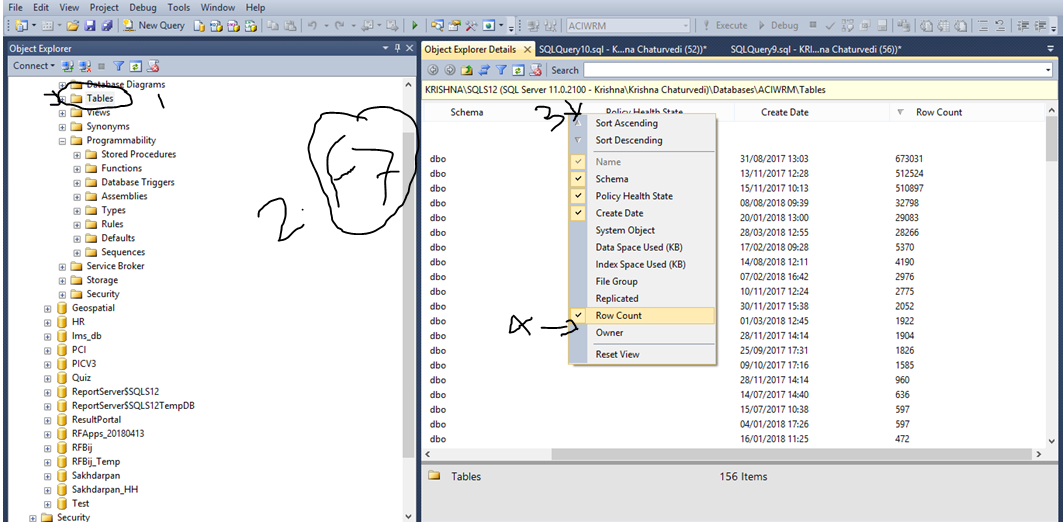
Get Row count of all tables in sql server

Step 1.  Select your database
Step 2. Expand and Go to on table folder
Step 3. Click on Table folter
Step 4. Fress F7
Step 5. Right click on Popup Column and Select row count


How to highlight selected text in notepad++

  –> To highlight a block of code in Notepad++, please do the following steps step-1  :- Select the required text. step-2  :- Right click...