Thursday, 16 August 2018

Get Comma separated all row for a single column using STUFF in sql server

///////////


Declare @Cols varchar(max)
SELECT  @Cols  = STUFF(( SELECT DISTINCT '],[' + LocationGUID from mstLocation where [Type]='WQ' ORDER BY '],[' +  LocationGUID FOR XML PATH('')), 1, 2, '') + ']'
select @Cols


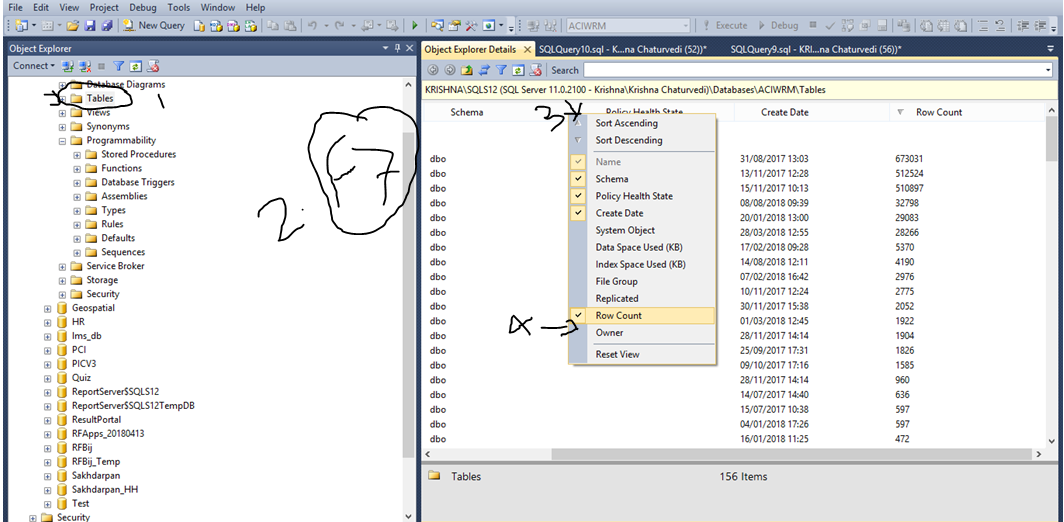
Get Row count of all tables in sql server

Step 1.  Select your database
Step 2. Expand and Go to on table folder
Step 3. Click on Table folter
Step 4. Fress F7
Step 5. Right click on Popup Column and Select row count


Wednesday, 18 July 2018

Single checked inside gridview using jquery

///////////// JS


function SingleCheckInside_Table(th) {
                        var userType = $(th).closest('tr').find('td').eq(1).html();
                        var selectedIndex = $(th).closest('tr').index();
                        $('[id*=TableID] tr').each(function (index, item) {
                            if (index > 0) {
                                if (selectedIndex != index) {
                                    $('[id*=TableID] tr').eq(index).find('[id*=CheckboxID]').prop('checked', false);

                                }
                            }
                        });
                    }

////////////////////////////html

  <table><tr><td>


<asp:CheckBox runat="server" ID="Checkboxid" onclick="return SingleCheckInside_Table(this);" />


 </td></tr></table>


Monday, 16 July 2018

Get Name of the month in sql query

//////////////

select left(DateName( month , DateAdd( month , month(Getdate()) , -1 )),3)

//////////// Jul

Disable Mouse Right Click, F12 and Ctrl+Shift+I, redirect to login page using jquery

////////////////////
http://ajax.googleapis.com/ajax/libs/jquery/3.2.1/jquery.min.js

////////////////////

<script type="text/javascript">
                    $(document).ready(function () {
                        $(document)[0].oncontextmenu = function () { return false; }
                        $(document).mousedown(function (e) {
                            if (e.button == 2) {
                                alert('Sorry, This functionality is not enable!');
                                window.location.href = "Default.aspx";
                                return false;
                            } else {
                                return true;
                            }
                        });
                    });
                    $(document).keydown(function (event) {
                        if (event.keyCode == 123) { // Prevent F12
                            alert('Sorry, This functionality is not enable!');
                            window.location.href = "Default.aspx";
                            return false;
                        } else if (event.ctrlKey && event.shiftKey && event.keyCode == 73) { // Prevent Ctrl+Shift+I  
                            alert('Sorry, This functionality is not enable!');
                            window.location.href = "Default.aspx";
                            return false;
                        }
                    });

Disable Cut, Copy & Paste on page using jquery

///////////
http://ajax.googleapis.com/ajax/libs/jquery/3.2.1/jquery.min.js

//////////////JS


    <script type="text/javascript">
          $(document).ready(function () {
              // Prevent full page
              $('body').bind('cut copy paste', function (e) {
                  e.preventDefault();
              });

              //Prevent particular part of the page
              $('#Control-id').bind('cut copy paste', function (e) {
                  e.preventDefault();
              });
          });
</script>

Disable Mouse Right Click using jquery

////////// using jquery liv-

http://ajax.googleapis.com/ajax/libs/jquery/3.2.1/jquery.min.js


      <script type="text/javascript">
                $(document).ready(function () {
                    //Disable full page
                    $("body").on("contextmenu", function (e) {
                        return false;
                    });

                    //Disable particular part of the page
                    $("#id").on("contextmenu", function (e) {
                        return false;
                    });
                });
            </script>

///////////////////////// or

<script type="text/javascript">
                    $(document).ready(function () {
                        $(document)[0].oncontextmenu = function () { return false; }
                        $(document).mousedown(function (e) {
                            if (e.button == 2) {
                                alert('Sorry, This functionality is not enable!');
                                return false;
                            } else {
                                return true;
                            }
                        });
                    });

                </script>

How to highlight selected text in notepad++

  –> To highlight a block of code in Notepad++, please do the following steps step-1  :- Select the required text. step-2  :- Right click...